Pop-ups & pop-unders
Scripts that call window.open to throw a new tab behind your back get a quiet null instead. That includes the hidden-iframe trick some ad libraries use to get around ordinary blockers.
 AdsClickShield
Add to Chrome
AdsClickShield
Add to Chrome
Free Chrome extension · v1.3.1
AdsClickShield stops pop-unders, invisible click traps and sneaky tab-swap redirects before the page can fire them. You click Play, you get Play.
01 — What it does
Shady sites hide ads behind your clicks. AdsClickShield goes after the three tricks they rely on most and shuts them down before they run.
Scripts that call window.open to throw a new tab behind your back get a quiet null instead. That includes the hidden-iframe trick some ad libraries use to get around ordinary blockers.
Full-page transparent overlays that steal your first click are hidden as the page loads and removed the moment they're added. Your click lands where you aimed it.
RemovedThe trick where your current tab quietly navigates to an ad while a copy of the site opens next to it. Script-driven clicks on external links are cancelled before they go anywhere.
Stopped02 — Features
The guard is injected at document_start, straight into the page, before any site script runs. Ad code finds the door already closed, even on pages with strict security policies.
The toolbar popup counts popups, redirects, click traps and ad setups on the current page, with a timeline of recent activity.
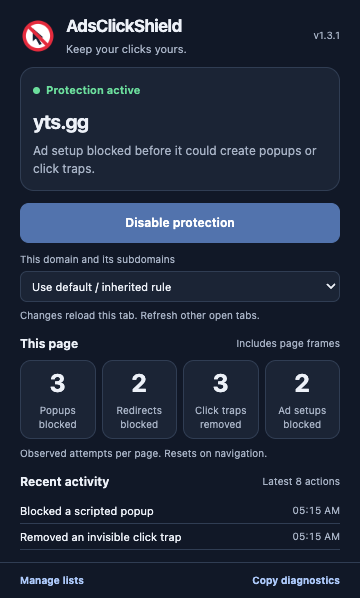
Up to 100 domains per list, subdomains included. More specific rules win, so you can trust example.com but still guard ads.example.com.
A single switch pauses protection everywhere while keeping your lists intact. The current tab reloads with your new choice right away.
Protect every site except the ones you allow, or protect only the sites you pick. Your call.
The popup and settings page follow your browser theme. Small, quiet and out of the way.
Your own clicks, regular links, links that open in a new tab, downloads and magnet links all work as usual. Only script-driven tricks are stopped.
03 — How it works
One click from the Chrome Web Store. Works on Chrome 119 and newer. No sign-up, no setup wizard.
Protection is on for every HTTP and HTTPS site by default. Already-open tabs pick it up after a refresh.
Popups return nothing, traps disappear, sneaky redirects go nowhere. Click the toolbar icon whenever you want to see what was stopped.
04 — Totally free
No subscription, no locked “pro” features, no upsell banners, no account. Everything described on this page is what you get the moment you install it.
05 — Privacy
AdsClickShield has no servers to send data to. Your settings stay in Chrome's local storage, and the activity counters live in page memory and disappear when you navigate away.
AdsClickShield
DATA COLLECTION RECEIPT
Thank you for browsing in peace.
storage
Saves your on/off switch and domain lists locally so they survive restarts.
scripting
Registers the guard that runs on pages before their scripts, and reads the page's live counters for the popup.
activeTab
Lets the popup see which site the current tab is on when you click the toolbar icon.
http://* · https://*
Needed to protect any website you visit. Browser pages such as chrome:// are never touched.
Tested in a real browser. An automated test suite loads the actual extension in Chromium and checks it against strict security policies, iframe bypasses, tab swaps, first-click traps and settings that persist across restarts.
06 — Any problem?
Tabs that were open before you installed or updated the extension need a refresh. Reload the tab and the guard loads with it. The popup shows Reload required when a tab is out of date.
AdsClickShield blocks all script-opened popups, including a few legitimate ones. Open the popup on that site and choose Allowlist for the domain. The tab reloads and that site works normally again.
Chrome doesn't let any extension run on its internal pages (chrome://, the Web Store) or on local files. That's a browser rule. Every normal HTTP/HTTPS website is covered.
Open Manage lists and switch the mode to Protect only disallowed domains, then add the sites you want guarded. Each entry covers its subdomains too.
No. The guard is a small script that patches a few browser functions once per page. There's no ad filter list to download, no network requests, and no background scanning.
Click Copy diagnostics at the bottom of the popup. It copies the version, current site, status and counters, but never your domain lists. Paste that into your report so we can see exactly what happened.
Report a problem →Free, private, and installed in about five seconds.
Add to Chrome — freeRequires Chrome 119 or newer · Works on HTTP & HTTPS websites